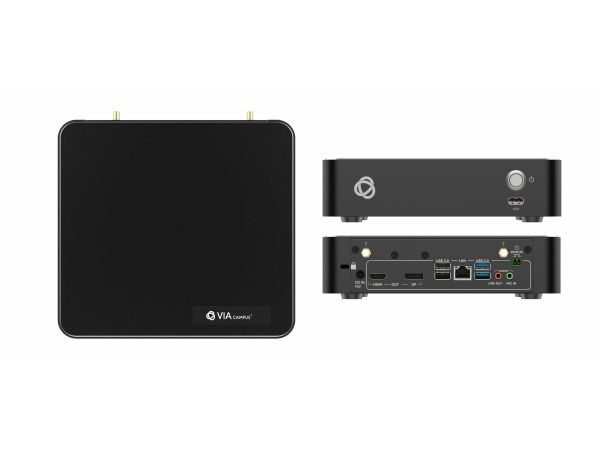
Item no.: [20811889] | Manufacturer: Kramer | Model no.: 87-80000690
out of stock
The item is not in stock. More info
Udsolgt
Varen er ikke på lager.
Brug funktionen ”Giv mig besked..." herunder for opdateringer.
Delivery options - Select at checkout
Shipping @price - GLS
12,00
EUR
2.161,27
Incl. VAT 2.701,59
Total incl. delivery
2.716,59
Notify me when the item is in stock again
Email:
Stock agent created. We will send an email when the item is in stock again.
Add to list
The function requires that you are logged in. Create a user and use our smart list system to keep track of future purchases, regular purchases or wish lists.
4K30 Wireless Presentation & Collaboration for Education, Training or Any Meeting Environment
VIA Campus² is a wireless presentation and collaboration solution that makes it easier to get actual work done during meetings. With any laptop or mobile device, users can view, edit and comment on documents in real time and record sessions. Kramer’s new VIA 4.0 is all about the end user. The new VIA application UI is intuitive, user-friendly and much easier to use. VIA 4.0 enables any user, including guests, to easily and securely connect and automatically disconnect at the end of the session. Meeting participants can display or stream full, uninterrupted video (up to 4K@30Hz) from their device, and even play YouTube® videos in full frame rate. VIA Campus² can show up to six user screens on a single main display and 12 on two displays. Users can also view the main display on their own device. VIA Campus² features iOS mirroring via AirPlay™, Windows & Android mirroring via Miracast™, as well as ChromeBook mirroring. The shared screen sizes are automatically adjusted based on their respective source, and can be resized manually by the user when needed. VIA Campus² supports 3rd party conferencing and office apps, such as Microsoft Office®, Teams®, SkypeforBusiness®, Zoom®, GoToMeeting®, and WebEx®. The solution can handle any size collaboration or meeting space.
Form factor
Desktop
Product colour
Black
Processor manufacturer
Intel
Processor frequency
2000 MHz
Processor cores
6
Supported video modes
2160p
RAM capacity
8 GB
Internal storage capacity
128 GB
Storage media
SSD
Supported audio channels
5.1
Antenna type
External
Antenna connector type
RP-SMA
Antennas quantity
2
Wi-Fi standards
Wi-Fi 5 (802.11ac)
Top Wi-Fi standard
Wi-Fi 5 (802.11ac)
Dual-band
Yes
WLAN controller model
Intel Dual Band Wireless-AC 3168
Ethernet LAN
Yes
Ethernet LAN data rates
10,100,1000 Mbit/s
Cabling technology
10/100/1000Base-T(X)
Interface
HDMI
Number of HDMI outputs
1
Ethernet LAN (RJ-45) ports
1
USB 2.0 ports quantity
3
USB 3.2 Gen 1 (3.1 Gen 1) Type-A ports quantity
2
Power source type
AC
Output voltage
19 V
Input current
6.32 A
Power consumption (max)
120 W
Operating temperature (T-T)
0 - 40 °C
Operating relative humidity (H-H)
40 - 70%
Storage temperature (T-T)
10 - 90 °C
Width
210 mm
Depth
190 mm
Height
50 mm
Weight
1.4 kg
Package width
405 mm
Package depth
297 mm
Package height
90 mm
Package weight
2.8 kg
AC adapter included
Yes
Warranty period
3 year(s)
The item is known under the following item numbers in our system
SKU:
87-80000690
Why do I find that the same product is available on different item numbers?
Manufacturers often release the same product with different item numbers, typically just different versions of the packaging. For example, the packaging may be targeted at different countries.
We try our best to unify the products, but it can happen that the same product appears on different item numbers in our system.