The item is in a remote warehouse, delivery time is 3-5 business days. More info
Delivery options- Click an option to choose
Shipping @price - GLS
12,00
EUR
62,51
Incl. VAT 78,14
Total incl. delivery
93,14
Add to list
The function requires that you are logged in. Create a user and use our smart list system to keep track of future purchases, regular purchases or wish lists.
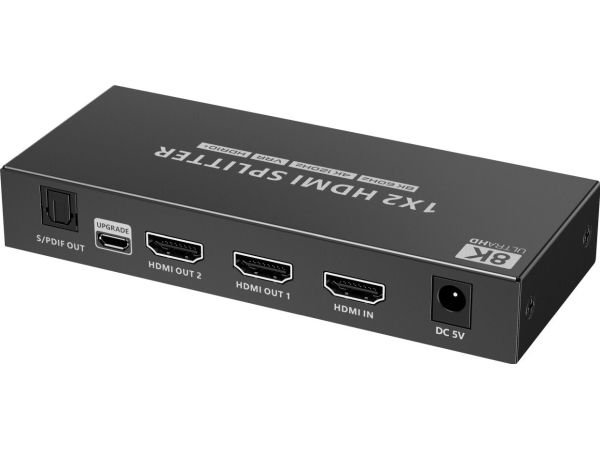
You can connect two HDMI screens to one HDMI signal source such as PC, laptop, DVD, set top box, etc. With automatic EDID down-scaling, a monitor with 8K, 4K or FULL HD 1080p resolution can be connected to the output
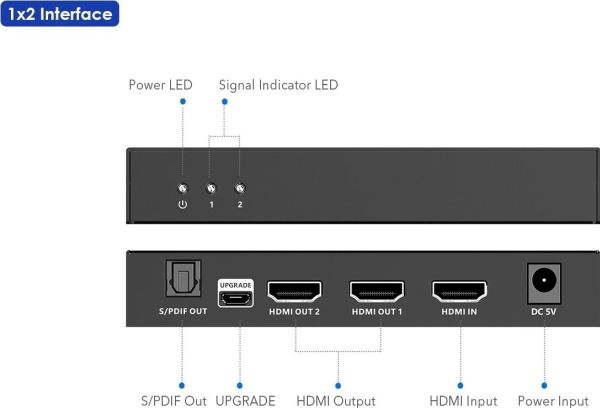
- Input: 1 x HDMI socket (Type A) - Output: 2 x HDMI socket (Type A) - Power supply via 230V/1A adapter - 1xLED power indication on front panel, 2xLED signal indication on ports - Resolution: 8K@60hz, 4K@120Hz, 1080p - Supports HDMI 2.1, HDMI 2.0 , HDMI1.4 - Supports HDR and HDR+, High Dynamic Range - Supports HDCP2.2 - S/PDIF output connector - Supports Dolby Digital/Plus, Dolby TrueHD, DTS-HD Master Audio+, DVD-Audio, SA-CD other supported standards: 3D, HDCP 2.2 , - Supports 8/10/12 bit color depth - Automatic intelligent EDID management allows you to connect different monitors at the output that support 8K or 4K or FULL HD 1080p resolution - Transmits both video and audio - Supports audio and DSD (Direct Stream Digital) and HD (HBR) audio - Nice little black metal case - Operating temperature: 0°C - 60°C - Power consumption: less 2.5W - Packed in a paper box with EAN code
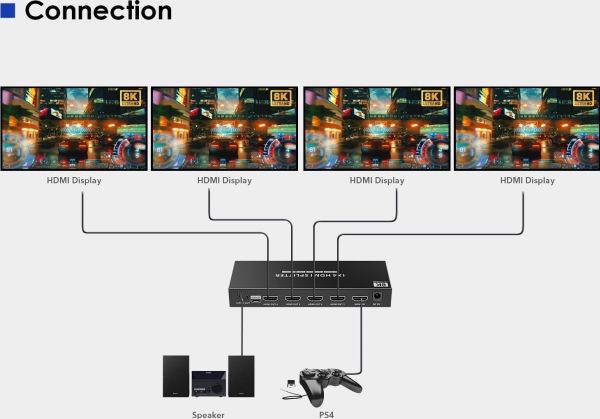
Wiring instructions: 1) Connect the input of the HDMI splitter with the HDMI cable to the signal source and connect the output to the display unit or monitor. 2) Plug the power adapter into the 230V power outlet and the DC 5V socket.
If the image does not appear immediately after plugging in the splitter, wait about 30s before the HDMI signal is detected.
The item is known under the following item numbers in our system
EAN:
8592220023942
SKU:
khsplit2m
Why do I find that the same product is available on different item numbers?
Manufacturers often release the same product with different item numbers, typically just different versions of the packaging. For example, the packaging may be targeted at different countries.
We try our best to unify the products, but it can happen that the same product appears on different item numbers in our system.